
How to Build a Continuous Feedback Loop with OpenPond
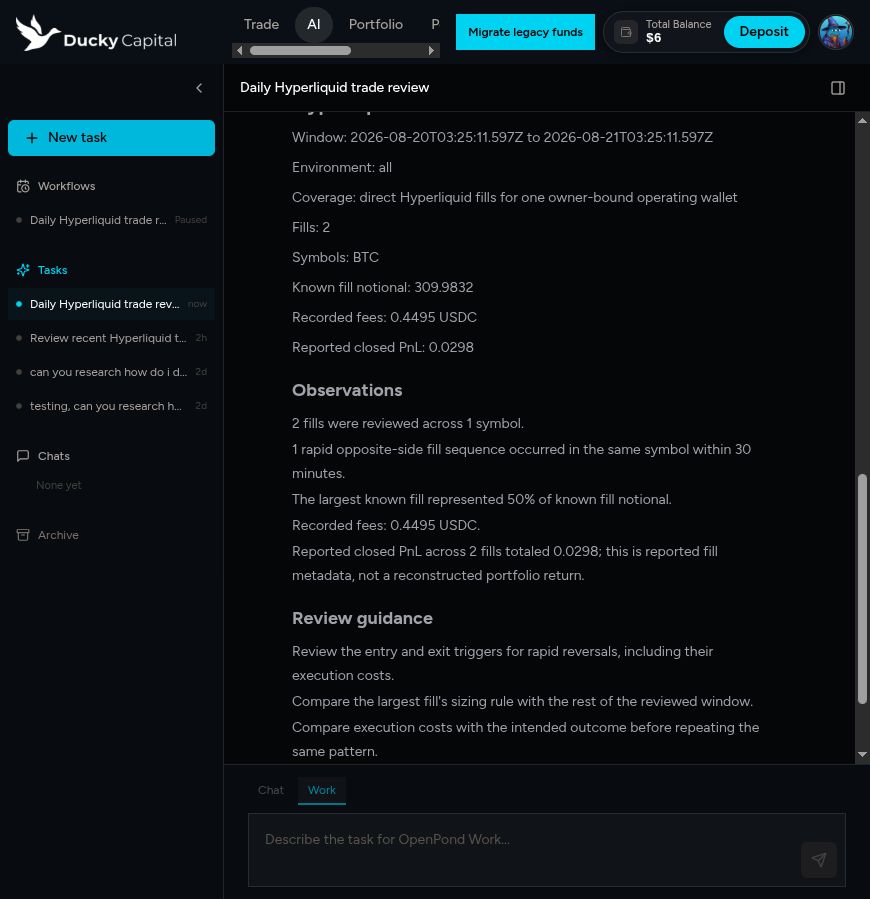
Ducky Capital runs a Hyperliquid trade review every 24 hours. OpenPond starts an isolated Sandbox, the Ducky Agent reads a bounded window of recent fills, and the report is attached to the user's Ducky Task. The Task stays in Ducky, so the next run can compare against the earlier reports and corrections.
Ducky owns the update loop. It decides which reports or corrections become eval cases, when to change the Agent's instructions or Skills, and when to publish a new release. OpenPond runs the scheduled work and returns the evidence; it does not update Ducky's Agent for it.
Architecture
Ducky owns the product, users, Task UI, and private trading data. The Agent SDK defines the Agent's actions, instructions, Skills, integrations, and artifacts. OpenPond publishes that source, schedules the work, runs it in a Sandbox, and records the run. Ducky's server uses openpond-sdk to connect the two systems.
Agent source → scheduled Sandbox run → Ducky Task history → Ducky Agent updateAgent SDK
openpond-agent-sdk defines the Agent contract: instructions, actions, workflows, Skills, integrations, artifacts, and evals. Schedules and hosted API calls come later through openpond-sdk.
npm install openpond-agent-sdkThe Ducky trade-review Agent has a narrow read-only action. It declares its input, its capability requirement, its artifacts, and the checks that a change must pass before publication.
import {
  action,
  defineAgentProject,
  defineIntegration,
  defineInstructions,
} from "openpond-agent-sdk";

import { reviewRecentHyperliquidTradesWorkflow } from "./workflows";

const duckyFills = defineIntegration({
  provider: "ducky-capital",
  required: true,
  capabilities: ["ducky.hyperliquid.read_recent_fills"],
});

export default defineAgentProject({
  name: "hyperliquid-trade-reviewer",
  manifestMode: "typescript",
  instructions: defineInstructions("./agent/instructions.md"),
  integrations: [duckyFills],
  defaultAction: "review-recent-hyperliquid-trades",
  actions: [
    action("review-recent-hyperliquid-trades", {
      label: "Review recent Hyperliquid trades",
      target: { kind: "workflow", workflow: reviewRecentHyperliquidTradesWorkflow },
      inputSchema: "ReviewRecentHyperliquidTradesInput",
      outputArtifacts: [
        "artifacts/recent-hyperliquid-trades.json",
        "artifacts/hyperliquid-trade-review.md",
      ],
      approval: { mode: "never", reason: "Read-only review." },
      schedule: { enabled: true, allowAdHoc: true },
    }),
  ],
  workflows: [reviewRecentHyperliquidTradesWorkflow],
});
Run the local checks before publishing. The Profile declares its SDK dependency, and OpenPond includes that dependency in the hosted source bundle. The Sandbox can install the bundle offline and reproduce the same release.
openpond-agent inspect
openpond-agent build
openpond-agent validate --json
openpond-agent eval --json
Publish the Profile
Publishing makes the local Agent available to the Team and gives OpenPond a versioned action it can schedule and run.
openpond profile check all
openpond profile commit --message "Publish Hyperliquid trade reviewer"
openpond profile push --team-id "$OPENPOND_TEAM_ID" --ensure-hosted
profile push uploads the committed Profile to the Team's hosted repository.
The --ensure-hosted flag creates that repository on the first push. OpenPond
then makes the Profile actions available to Work, Sandboxes, schedules, and
Team chat. Each run stays pinned to the published version it used.
Product integration
Ducky uses openpond-sdk on its server to read the published action catalog, create a Saved Work definition, and invoke a pinned action. The browser never receives an OpenPond API key or an action capability grant.
npm install openpond-sdkimport { createOpenPondClient } from "openpond-sdk";
const openpond = createOpenPondClient({
apiKey: process.env.OPENPOND_API_KEY!,
});
const catalog = await openpond.profileActions.catalog({
teamId,
profileName: "ducky-capital",
});
const review = catalog.actions.find(
(candidate) => candidate.key === "review-recent-hyperliquid-trades",
);
if (!review || review.setupStatus !== "ready") {
throw new Error("trade_review_action_not_ready");
}
await openpond.workflows.create({
clientRequestId: `ducky-daily-review:${workflowBindingId}`,
name: "Daily Hyperliquid trade review",
prompt: "Review recent Hyperliquid trades and attach the report to the Ducky Task.",
recurrence: {
version: 1,
kind: "daily",
timeZone: "America/New_York",
startDate: "2026-08-20",
localTime: "08:00",
end: { kind: "never" },
},
target: {
kind: "external_callback",
callbackUrl: "https://www.ducky.capital/api/internal/openpond/workflow-callback",
externalReference: workflowBindingId,
},
});Schedule and Sandbox lifecycle
Saved Work stores the cadence, timezone, retry policy, overlap protection, and run history. It also provides run-now and pause/resume controls. When a review is due, OpenPond calls Ducky's verified callback. Ducky resolves the owner-scoped binding, creates or updates the Task, and invokes the stored Profile action and catalog version.
OpenPond creates an isolated Sandbox from the published Profile release. The Sandbox installs the published SDK dependency offline, loads the action's declared runtime, and receives the inputs and capabilities approved for that run. Wallet keys and general Ducky account access stay outside the Sandbox.
For the trade review, Ducky issues a one-time, read-only capability for recent normalized fills. It expires after the run and cannot sign or place trades. Ducky keeps identity and authorization; OpenPond only receives the access needed to produce the report.
Feedback and updates
The Sandbox is short-lived. The Ducky Task remains, with the report, progress, action key, Profile release, trace, and artifacts. A person can inspect the result, ask a follow-up question, correct an assumption, or mark a recommendation as useful or wrong.
A wrong answer, missing citation, or weak report can become an eval case in Ducky's Agent project. The next release then has to pass that case. Ducky can also update an instruction or Skill when the Task history shows a repeated problem.
Ducky did not use the OpenPond Harness Refiner for this implementation. Its own service keeps the daily history and decides whether the evidence should change the Agent. Ducky runs the evals and validation before publishing the next release.
Another product could plug the Refiner into the same evidence stream. It can return no_action, route work to an eval or another system, or propose an exact memory, prompt, Skill, or Agent edit. How the OpenPond Harness Refiner Works covers that optional path.
The same setup can run support reviews, sales-call follow-ups, operational audits, or research digests. The product owns its users, data, history, and update policy. The Agent SDK defines the work. OpenPond schedules and runs it.