
How the OpenPond Harness Refiner Works
A conversation can end with the right answer even when the Agent took a bad path getting there. Maybe the Agent called the wrong tool three times, recovered from a mistake it should not have made, or ignored a rule that was sitting in its instructions the whole time. The user got an answer, but the next task will probably hit the same problem.
We built the Refiner Agent to look at what happened after the task is over. It can leave the Harness alone, propose a small change to memory, instructions, a Skill, or an Agent, or recommend a more advanced path, such as building a Taskset and using Managed RL. Most of the time, leaving things alone is the right answer.
Continuously updating the Harness
Inside OpenPond Chat and Work is a persistent, stateful meta-Harness containing Agents, Skills, memory, and instructions. The Refiner Agent can update those sources after a completed turn or from a daily review. They sit alongside the Agents and Skills you author yourself and work the same way.
Say the Refiner Agent recommends creating a new SKILL.md file to capture a
workflow. In the next conversation, OpenPond Chat can load that Skill just as it
would one you wrote yourself.
The goal is to streamline bug discovery by automatically finding problems and updating the Harness with a dedicated background Agent.
Refiner Agent
Here is how the Refiner Agent works in more detail.
Per-turn and daily runs
The Refiner Agent can start after a completed model turn or during a daily run that looks across a broader set of conversations. In either case, the evidence is packaged for Refiner and the work continues in the background.
The evidence package includes:
- the request, result, and relevant conversation context;
- tool traces, artifacts, failures, retries, and Evaluation results;
- the available memory, instructions, Skills, and Agent sources; and
- related evidence packages from multiple conversations during the daily run.
Decision time
With that context in front of it, the first model pass asks what actually went wrong. Is this a reusable Harness problem, or was it just a weird task? Did a tool break? Would putting this into the instructions copy a customer's data or one-off file path into every future task?
The same error message can come from two unrelated problems, and two different traces can share the same cause. Refiner has three possible answers:
| Outcome | What it means |
|---|---|
| No action | The evidence does not justify a lasting change. |
| Advanced recommendation | The problem needs runtime or product work, a better Taskset, or Managed RL. |
| Propose a Harness change | One exact memory, instructions, Skill, or Agent edit is justified. |
An advanced recommendation means the problem looks real, but changing the Harness would be the wrong fix. A tool outage belongs to runtime. A UI bug belongs to the product. A missing capability may need a Taskset and Evaluation, then Managed RL. Refiner can recommend that path, but it does not start a training run by itself.
Before finalizing an advanced recommendation or Harness change, a second model pass tries to prove the decision wrong.
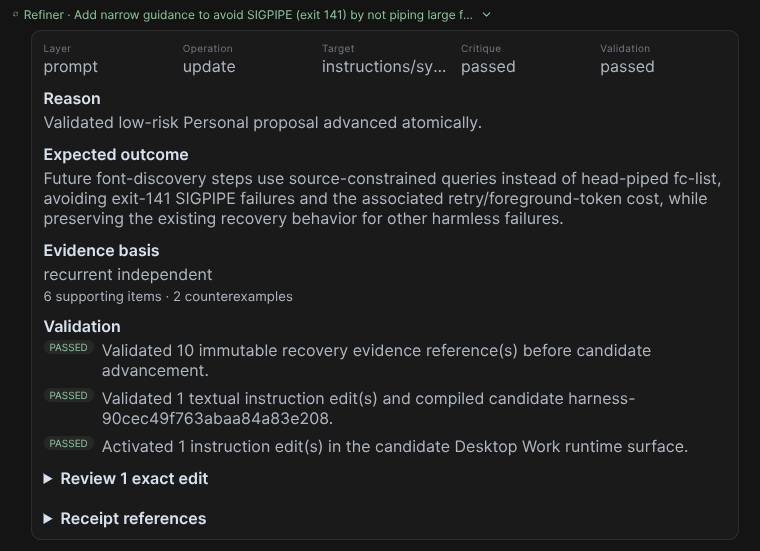
When Refiner proposes a Harness change, it chooses one target: memory, instructions, a Skill, or an Agent. It names the exact source and proposes the smallest edit that should prevent the problem from happening again. For example, it might update a PDF Skill like this:
- Use the default PDF writer.
+ Use the PDF writer only for new documents. Preserve existing PDFs with the supported incremental editor.
The proposal includes that diff, the Skill file it belongs to, and the evidence behind it. It does not rewrite the whole Skill or silently apply the change.
Validate and update the Harness
OpenPond applies the proposed edit to a candidate Harness release, then runs the
appropriate code checks, tests, or Evaluations. This is especially important
when Refiner creates or updates a deterministic Agent written with
openpond-agent-sdk.
If the change passes, OpenPond creates a new immutable Harness release. The old
one stays around, so the change can be inspected or rolled back later.
Where Refiner runs
You can use Refiner in managed OpenPond Web or locally in OpenPond Desktop today.
Web is the managed version. OpenPond handles the storage, models, and schedule. Desktop runs locally beside your projects. The Desktop app and the portable Harness package are open source in the OpenPond repository, so you can inspect the exact review and release path yourself.
In either app, open Settings → Harness. Refine completed turns controls the per-turn Refiner, while Review recurring patterns controls recurring review.
Want to use Refiner in your own Agent system? Install @openpond/harness and
bring your own model, evidence, storage, and validation. The
package README
shows the standalone integration.